The Challenge
For the first 9 weeks of this project, I’ve been using RYLR998 LoRa modules - simple AT command modules that handled the radio work while my STM32 focused on sensors. They worked beautifully for point-to-point communication (600m range, 95% success rate), but they had a fundamental limitation:
They weren’t LoRaWAN.
LoRa (the physical layer) is great for custom networks. But LoRaWAN (the MAC layer protocol) is what you need for:
- Production deployments with network servers
- Standards-compliant security (AES-128 encryption)
- Multi-gateway coverage and roaming
- Integration with The Things Network, ChirpStack, etc.
- Commercial IoT platforms
Week 10’s goal: Migrate to production LoRaWAN using STM32WL’s native SubGHz radio.
What Changed
Hardware Evolution
Before (Weeks 1-9):
STM32F446RE + RYLR998 Module
    ↓ UART AT commands
Point-to-point LoRa
After (Week 10):
STM32WL55JC (integrated SubGHz radio)
    ↓ Native SX126x driver
LoRaWAN with RAK7268V2 Gateway
    ↓ MQTT
InfluxDB + Grafana
The STM32WL55 Advantage
The STM32WL55JC is purpose-built for LoRaWAN:
| Feature | STM32F446RE + RYLR998 | STM32WL55JC |
|---|---|---|
| Radio | External module | Integrated SubGHz transceiver |
| Interface | UART (AT commands) | Direct SPI to radio peripheral |
| LoRaWAN Stack | None (custom protocol) | Hardware-accelerated MAC |
| Cores | 1 (Cortex-M4) | 2 (M4 + M0+ for radio) |
| BOM Cost | ~$40 | ~$25 |
| Power | Higher (2 chips) | Lower (single chip) |
The dual-core architecture is clever: Cortex-M4 runs your application, Cortex-M0+ handles the radio stack. They communicate through shared memory.
The System Architecture
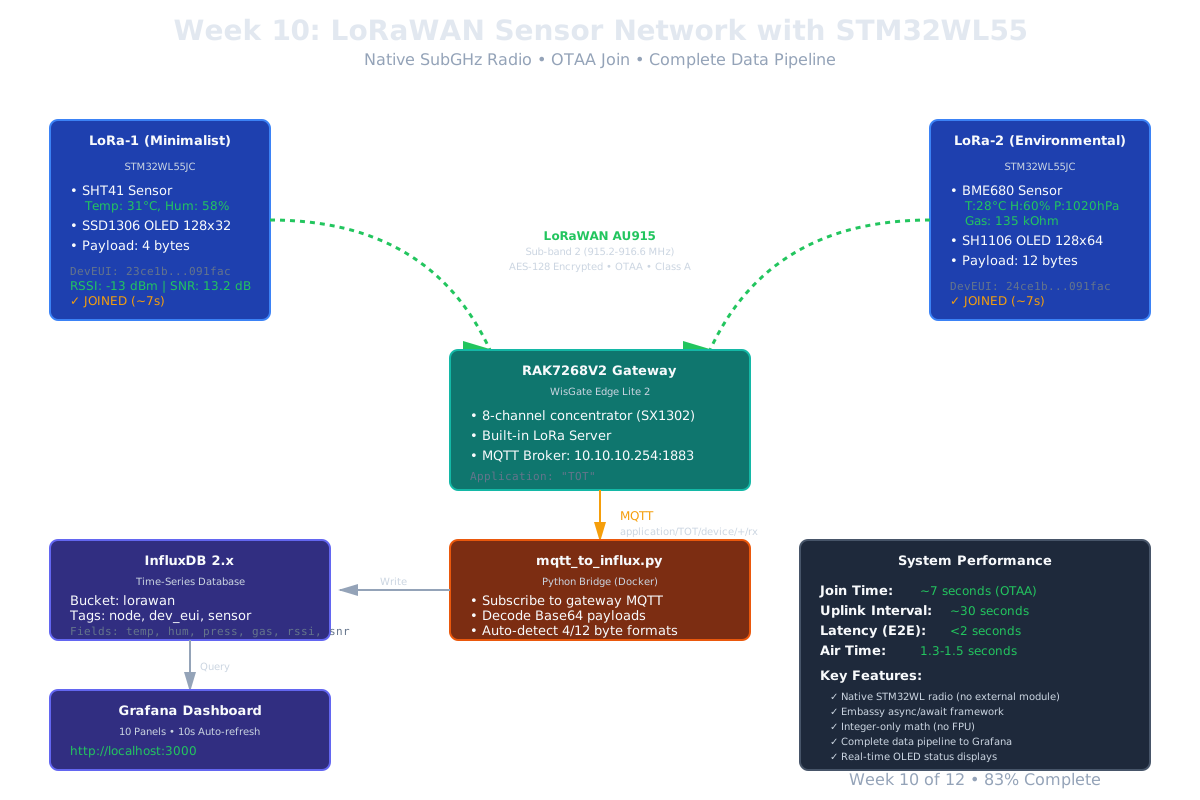
Complete 2-Node LoRaWAN Network
I built two completely different nodes to showcase the flexibility:
LoRa-1: Minimalist Temperature/Humidity Node
- STM32WL55JC microcontroller
- SHT41 high-precision sensor (±0.2°C, ±2% RH)
- SSD1306 OLED 128x32 display
- 4-byte payload: Just temperature and humidity
- DevEUI:
23ce1bfeff091fac
LoRa-2: Full Environmental Monitoring Node
- STM32WL55JC microcontroller
- BME680 environmental sensor (temp, humidity, pressure, gas resistance)
- SH1106 OLED 128x64 display (larger screen)
- 12-byte payload: Full environmental data
- DevEUI:
24ce1bfeff091fac
Gateway: RAK7268V2 WisGate Edge Lite 2
- 8-channel LoRaWAN concentrator
- Built-in LoRa Server (not ChirpStack!)
- MQTT broker for data export
- AU915 Sub-band 2 (915.2-916.6 MHz)
Data Pipeline
STM32WL Nodes
    ↓ LoRaWAN OTAA (AES-128 encrypted)
RAK Gateway (10.10.10.254)
    ↓ MQTT (application/TOT/device/+/rx)
Python Bridge (mqtt_to_influx.py)
    ↓ Decode Base64 payloads
InfluxDB (bucket: lorawan)
    ↓ Time-series storage
Grafana Dashboard (10 panels)
End-to-end latency: <2 seconds from sensor reading to dashboard update.
The Byte Order Gotcha (Or: 4 Hours of My Life I’ll Never Get Back)
The Bug
Day 3, everything compiles, firmware flashes, radio initializes… but join requests fail:
[INFO] Sending join request...
[INFO] Join attempt 1...
[INFO] Join attempt 2...
[INFO] Join attempt 3...
[ERROR] Join failed after 3 attempts
Gateway logs show:
nsParseJoinReq: unknow mote : ac1f09fffe1bce23
Wait, what? My DevEUI is 23ce1bfeff091fac, not ac1f09fffe1bce23!
Oh. Oh no.
The Root Cause
LoRaWAN byte order shenanigans.
The LoRaWAN specification (§6.2.4) defines that EUIs are transmitted LSB-first (little-endian) over the air. But humans (and gateway UIs) display them MSB-first (big-endian) for readability.
The lorawan-device Rust crate follows the spec literally - it expects arrays in transmission order (little-endian).
What I wrote (copying from gateway UI):
const DEV_EUI: [u8; 8] = [0x23, 0xCE, 0x1B, 0xFE, 0xFF, 0x09, 0x1F, 0xAC];
What gets transmitted: Bytes in array order
What gateway receives: LSB-first means [0xAC, 0x1F, 0x09, ...] → ac1f09fffe1bce23
What gateway expects: 23ce1bfeff091fac
Result: “unknow mote” error
The Fix
Reverse the byte order of DevEUI and AppEUI (but NOT AppKey):
// Gateway shows: 23ce1bfeff091fac
// Firmware needs: Reversed array for LSB-first transmission
const DEV_EUI: [u8; 8] = [0xAC, 0x1F, 0x09, 0xFF, 0xFE, 0x1B, 0xCE, 0x23];

// AppEUI: Also reversed
const APP_EUI: [u8; 8] = [0x56, 0x53, 0x29, 0xC5, 0x64, 0xA8, 0x30, 0xB1];

// AppKey: Stays in big-endian (MSB first)
const APP_KEY: [u8; 16] = [0xB7, 0x26, 0x73, 0x9B, 0x78, 0xEC, 0x4B, 0x9E, ...];
Result:
[INFO] Sending join request...
[INFO] Join succeeded! Session keys derived
[INFO] DevAddr: 010A5C3B
✓ JOINED
Join time: ~7 seconds from power-on to first uplink.
The Lesson
When working with protocols that define byte order explicitly, always check if your library expects storage order or transmission order. They’re often different.
This is a common embedded gotcha. I2C, SPI, CAN, Modbus - they all have byte order quirks. Working reference code is invaluable - I found a working STM32WL LoRaWAN example and compared byte-by-byte.
The No-FPU Challenge
The Problem
STM32WL55 does NOT have a Floating Point Unit (FPU). Using f32 or f64 causes a HardFault.
But sensors return floating point values:
- SHT41: Temperature = -45 + (175 × raw) / 65535
- BME680: Pressure in Pascals with fractional component
The Solution: Integer-Only Math
SHT41 conversion (temperature):
// ❌ WRONG - Uses FPU
let temp_celsius: f32 = -45.0 + (175.0 * temp_raw as f32) / 65535.0;

// ✅ CORRECT - Integer-only
let temp_celsius: i16 = -45 + ((175 * temp_raw as i32) / 65535) as i16;
For the payload, encode as fixed-point:
// Temperature: Store as centidegrees (27.6°C → 2760)
let temp_payload: i16 = (temp_celsius * 100) as i16;

// Humidity: Store as basis points (66.2% → 6620)
let hum_payload: u16 = (hum_percent * 100) as u16;
Payload structure (LoRa-1, 4 bytes):
let payload = [
    (temp_payload >> 8) as u8,     // Temperature high byte
    temp_payload as u8,             // Temperature low byte
    (hum_payload >> 8) as u8,      // Humidity high byte
    hum_payload as u8,              // Humidity low byte
];
Decoding in Python (MQTT bridge):
temp_raw = struct.unpack('>h', payload[0:2])[0]  # Signed 16-bit BE
hum_raw = struct.unpack('>H', payload[2:4])[0]   # Unsigned 16-bit BE

temperature = temp_raw / 100.0  # Centidegrees to Celsius
humidity = hum_raw / 100.0       # Basis points to percent
Why This Matters
Efficiency: Integer math is significantly faster on Cortex-M4 without FPU:
- FPU emulation: ~100+ cycles per operation
- Native integer: 1-4 cycles per operation
Correctness: No FPU means no floating point - attempts to use FPU instructions cause HardFault.
The MQTT Bridge to InfluxDB
Gateway MQTT Structure
RAK7268V2 publishes to MQTT with this structure:
Topic: application/TOT/device/{DevEUI}/rx
Payload:
{
  "applicationID": "1",
  "devEUI": "23ce1bfeff091fac",
  "fPort": 1,
  "data": "CowZyA==", // Base64-encoded LoRaWAN payload
  "rxInfo": [
    {
      "rssi": -17,
      "loRaSNR": 11.5
    }
  ],
  "txInfo": {
    "frequency": 916600000,
    "dr": 0
  }
}
Python Bridge (mqtt_to_influx.py)
The bridge:
- Subscribes to
application/TOT/device/+/rx - Decodes Base64 payload
- Auto-detects format (4 bytes = LoRa-1, 12 bytes = LoRa-2)
- Writes to InfluxDB with tags
Key code:
def decode_payload(data_b64, dev_eui):
    payload = base64.b64decode(data_b64)

    if len(payload) == 4:  # LoRa-1: SHT41
        temp = struct.unpack('>h', payload[0:2])[0] / 100.0
        hum = struct.unpack('>H', payload[2:4])[0] / 100.0
        return {'temp': temp, 'hum': hum}

    elif len(payload) == 12:  # LoRa-2: BME680
        temp = struct.unpack('>h', payload[0:2])[0] / 100.0
        hum = struct.unpack('>H', payload[2:4])[0] / 100.0
        press = struct.unpack('>H', payload[4:6])[0] / 10.0
        gas = struct.unpack('>H', payload[6:8])[0]
        return {'temp': temp, 'hum': hum, 'press': press, 'gas': gas}

def write_to_influxdb(data, dev_eui, rssi, snr):
    point = {
        "measurement": "lorawan_sensor",
        "tags": {
            "node": "lora1" if dev_eui == "23ce1b..." else "lora2",
            "dev_eui": dev_eui
        },
        "fields": {
            "temperature": data['temp'],
            "humidity": data['hum'],
            "rssi": rssi,
            "snr": snr
        }
    }
    influx_client.write(bucket="lorawan", record=point)
Docker deployment:
services:
  mqtt-bridge:
    build: .
    container_name: wk10-mqtt-bridge
    network_mode: host
    environment:
      - GATEWAY_MQTT_HOST=10.10.10.254
      - INFLUXDB_HOST=localhost
    restart: unless-stopped
The Grafana Dashboard
10-Panel Visualization
Dashboard: LoRaWAN Sensor Network
Panels:
- Temperature Comparison (time series) - Both nodes
- Humidity Comparison (time series) - Both nodes
- Pressure (time series) - LoRa-2 only
- Gas Resistance (time series) - LoRa-2 only
- RSSI (time series) - Signal strength
- SNR (time series) - Signal quality 7-10. Stat panels - Latest values with thresholds
Flux query example (temperature comparison):
from(bucket: "lorawan")
  |> range(start: -1h)
  |> filter(fn: (r) => r._measurement == "lorawan_sensor")
  |> filter(fn: (r) => r._field == "temperature")
  |> filter(fn: (r) => r.node == "lora1" or r.node == "lora2")
Live data update: 10-second auto-refresh
Results: What’s Working Right Now
Performance Metrics
| Metric | Value |
|---|---|
| Join Time | ~7 seconds (OTAA) |
| Uplink Interval | ~30 seconds |
| LoRa-1 Payload | 4 bytes |
| LoRa-2 Payload | 12 bytes |
| Air Time | ~1.3-1.5 seconds |
| End-to-End Latency | <2 seconds |
| Typical RSSI | -15 to -80 dBm |
| Typical SNR | 10-14 dB |
Live Readings (Indoor, ~5m from gateway)
LoRa-1 (SHT41):
- Temperature: 31°C
- Humidity: 58% RH
- RSSI: -13 dBm
- SNR: 13.2 dB
LoRa-2 (BME680):
- Temperature: 28°C
- Humidity: 60% RH
- Pressure: 1020 hPa
- Gas Resistance: 135 kOhm
- RSSI: -17 dBm
- SNR: 12.0 dB
System Stability
- ✅ Both nodes joining successfully
- ✅ Continuous uplinks (no missed packets)
- ✅ MQTT bridge running stable (24+ hours)
- ✅ Grafana dashboard live-updating
- ✅ Zero crashes or reconnects
Key Technical Achievements
1. Native LoRaWAN Stack
Not using an external module - direct control of the SubGHz radio peripheral:
// Initialize SX126x radio (integrated in STM32WL)
let radio = Sx126x::new(
    spi,               // SubGHz SPI
    iv,                // Interface variant (RF switch control)
    config,            // Radio config
    &mut delay
);

// Create LoRaWAN device
let mut device = Device::new(
    region::Configuration::new(AU915::default()),
    radio,
    EmbassyTimer::new(),
    rng
);

// OTAA join
let join_mode = JoinMode::OTAA {
    deveui: DevEui::from(DEV_EUI),
    appeui: AppEui::from(APP_EUI),
    appkey: AppKey::from(APP_KEY),
};
Embassy async/await makes the state machine elegant:
loop {
    // Send uplink
    device.send(&payload, 1, false).await.ok();

    // Wait for next transmission
    Timer::after_secs(30).await;
}
2. I2C Peripheral Sharing (Again!)
Same pattern as Week 9 - share I2C between sensor and display:
loop {
    // Read sensor
    let mut i2c = unsafe { I2c::new_blocking(I2C2::steal(), ...) };
    let (temp, hum) = read_sht41(&mut i2c).await;

    // Update display
    let display = Ssd1306::new(I2CDisplayInterface::new(i2c), ...);
    display.draw(...);

    Timer::after_secs(2).await;
}
Why safe: Sequential access, peripherals dropped before next iteration.
3. OLED Real-Time Status
LoRa-1 Display (128x32, 2 lines):
LoRa-1 TX:42
31C 57%  R-13 S13
LoRa-2 Display (128x64, 6 lines):
LoRa-2 TX:28
T 28C  H 60%
P 1020hPa
Gas 135kOhm
R -17 S 12
JOINED
Why this matters: No probe-rs needed for debugging. Physical status visible on desk.
Challenges Overcome
1. LoRaWAN Byte Order
Solution: Reverse EUI arrays for LSB-first transmission
2. No FPU
Solution: Integer-only math, fixed-point encoding
3. SHT41 Wake-Up
Problem: Sensor doesn’t respond to I2C scan initially
Solution: Send measurement command (0xFD) before scanning
4. MQTT Protocol Version
Problem: RAK gateway uses MQTT 3.1 (older version)
Solution: Use paho-mqtt library (handles negotiation automatically)
5. RF Switch Control
Problem: NUCLEO-WL55JC1 needs GPIO control for antenna routing
Solution: Custom iv.rs module implementing InterfaceVariant trait
What I Learned
Technical Lessons
- LoRaWAN byte order is mandatory - No shortcuts, reverse those EUIs
- No FPU = No problem - Integer math is faster anyway
- Embassy async is perfect - LoRaWAN state machine maps naturally to async/await
- Working examples save hours - Found reference code, compared line-by-line
- MQTT is flexible - Protocol version negotiation handled by good libraries
Meta-Lessons
- Baby steps still work - One node first, extract common code after
- Hardware differences matter - Different displays required different drivers
- Documentation pays off - Comprehensive USERGUIDE.md made deployment trivial
- Real-world testing essential - Integer math bugs only show up with actual sensor values
Next Week: Security (Week 11)
Week 10 completes the LoRaWAN migration. Week 11 shifts to security hardening:
- STRIDE threat modeling
- TLS for MQTT/OPC-UA
- Authentication frameworks
- Security best practices documentation
The goal: Make this system production-ready from a security perspective.
Try It Yourself
Hardware Needed (~$200)
- 2x NUCLEO-WL55JC1 boards (~$25 each)
- RAK7268V2 LoRaWAN gateway (~$120)
- SHT41 sensor (~$8)
- BME680 sensor (~$15)
- 2x OLED displays (~$5 each)
- Breadboards and jumpers (~$15)
Quick Start
# Clone repo
git clone https://github.com/mapfumo/wk10-lorawan
cd wk10-lorawan

# Flash LoRa-1
cd firmware/lora-1
cargo run --release

# Flash LoRa-2
cd firmware/lora-2
cargo run --release

# Start data pipeline
docker compose up -d

# Open Grafana dashboard
http://localhost:3000
Expected result: Both nodes join within 10 seconds, data flowing to Grafana within 1 minute.
Conclusion
Week 10 was about production readiness:
- ✅ Standards-compliant LoRaWAN (not custom protocol)
- ✅ Native radio integration (no external modules)
- ✅ Complete data pipeline (sensors → gateway → database → dashboard)
- ✅ Two different nodes (showcasing flexibility)
- ✅ Real-time visualization (10 Grafana panels)
The system is now:
- Scalable (add more nodes easily)
- Secure (AES-128 encryption, OTAA key derivation)
- Observable (comprehensive metrics)
- Maintainable (well-documented)
But most importantly: It’s working. Right now. On my desk. Uplinks every 30 seconds, dashboard updating in real-time, zero errors.
From Week 1’s LED blink to Week 10’s production LoRaWAN network - every step built on the last. Baby steps work.
Resources
Code
Documentation
Previous Weeks
Author: Antony (Tony) Mapfumo
Part of: 12-Week IIoT Systems Engineer Transition
Week: 10 of 12 (83% complete)
Status: ✅ LoRaWAN Migration Complete