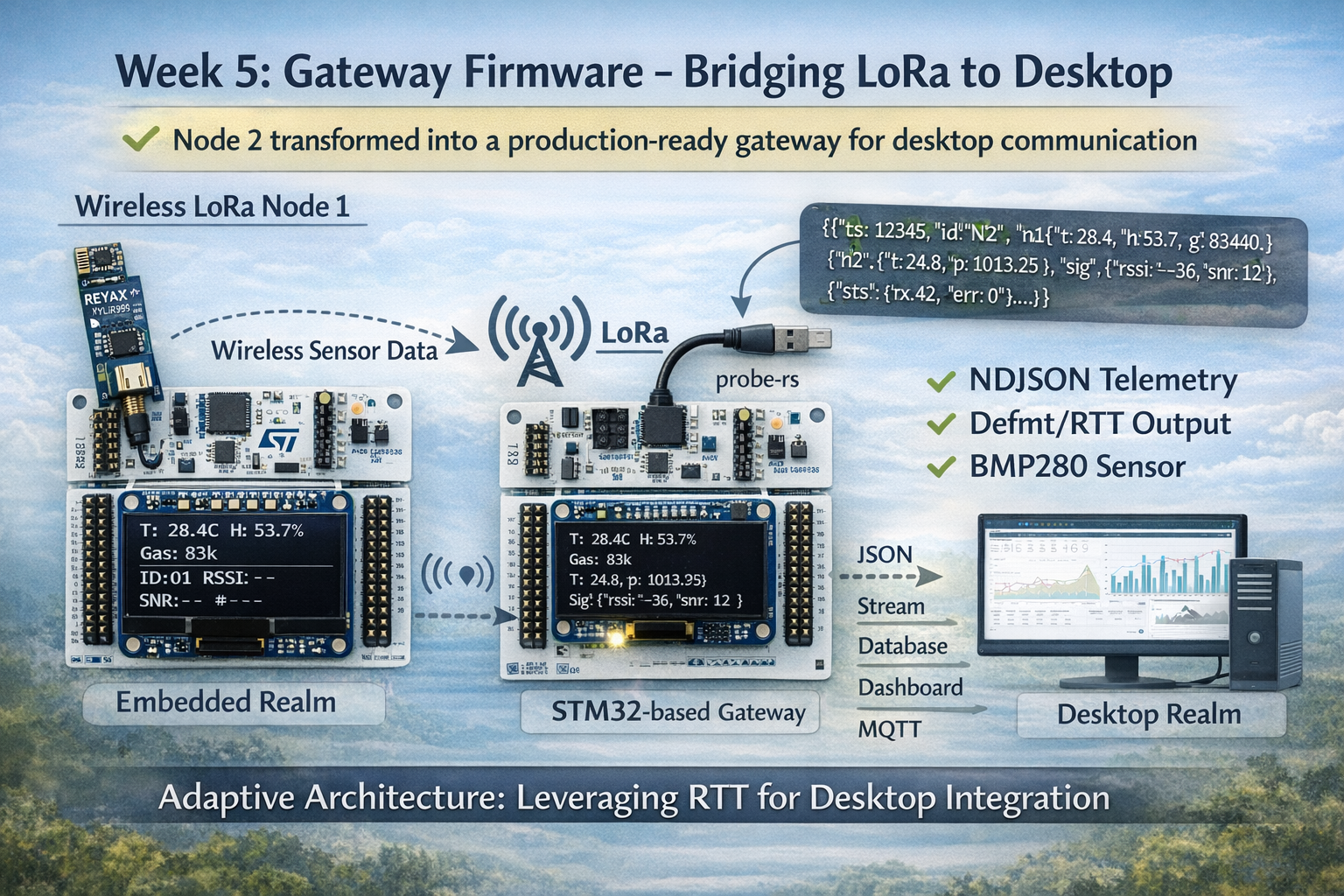
Week 5 was supposed to be straightforward: add USB-CDC to Node 2, stream JSON telemetry to the desktop. Simple, right?
Spoiler: The “simple” solution was blocked by hardware. Then the “good” solution was blocked by firmware. The working solution came from adapting to constraints instead of fighting them.
This is the story of how Week 5 became a lesson in engineering pragmatism - and why the best solution isn’t always the most elegant one.
Table of Contents
The Objective
Week 5 had a clear goal: transform Node 2 from a simple LoRa receiver into a production gateway that bridges wireless sensor data to desktop infrastructure.
The Requirements
- Desktop accessibility: Get sensor data off the MCU and into a format desktop tools can consume
- Real-time streaming: Process data as it arrives, not in batches
- Human-readable: JSON format for easy debugging and integration
- Efficient: Compact representation to minimize overhead
- Robust: System must handle errors gracefully
The Foundation
Week 5 builds directly on Week 3’s binary protocol:
- ✅ LoRa packets arrive with sensor data
- ✅ CRC validation ensures integrity
- ✅ ACK/NACK provides reliability
- ✅ OLED displays real-time metrics
Missing piece: No way to get data to the desktop.
The Three Attempts
Plan A: USB-CDC (Blocked by Hardware)
The Idea
Use the STM32F446’s USB OTG_FS peripheral (PA11/PA12) to create a virtual serial port.
Benefits:
- Native USB, no middleware needed
- High bandwidth (~12 Mbps Full-Speed USB)
- Standard CDC class (built into all OSes)
- Clean, professional solution
Implementation would look like:
// USB OTG_FS on PA11 (D-) and PA12 (D+)
let usb = USB {
    usb_global: dp.OTG_FS_GLOBAL,
    usb_device: dp.OTG_FS_DEVICE,
    usb_pwrclk: dp.OTG_FS_PWRCLK,
    pin_dm: gpioa.pa11.into_alternate(),
    pin_dp: gpioa.pa12.into_alternate(),
    hclk: clocks.hclk(),
};

let usb_bus = UsbBus::new(usb, &mut EP_MEMORY);
let mut serial = SerialPort::new(&usb_bus);
The Discovery
I grabbed my Nucleo-F446RE, checked the schematic, and found the problem:
PA11 and PA12 are not connected to anything.
The Nucleo board has:
- ✅ ST-Link debugger with USB connector
- ✅ Virtual COM Port capability (in theory)
- ❌ No native USB connector
- ❌ PA11/PA12 not broken out to headers
Impact: Would need external USB hardware (breakout board, wiring, drivers). This defeats the “use what you have” principle that guides the learning plan.
Decision: Plan A is blocked. Move to Plan B.
Plan B: USART2 VCP (Blocked by Firmware)
The Idea
The ST-Link debugger chip on the Nucleo has a Virtual COM Port (VCP) feature. Some pins on the STM32 (PA2/PA3 for USART2) are connected to the ST-Link chip, which can bridge them to USB.
Benefits:
- No additional hardware needed
- Uses same USB cable as programming
- Standard serial port interface (
/dev/ttyACM0) - Simple UART implementation in firmware
How it should work:
STM32 USART2 (PA2/PA3) → ST-Link chip → USB → Desktop (/dev/ttyACM0)
The Implementation
I implemented the firmware side:
// Configure USART2 at 115200 baud
let vcp_uart = Serial::new(
    dp.USART2,
    (gpioa.pa2, gpioa.pa3),
    SerialConfig::default().baudrate(115200.bps()),
    &clocks,
).unwrap();

// In UART interrupt, after parsing LoRa packet:
let json = format_json_telemetry(...);
cx.shared.vcp_uart.lock(|uart| {
    for byte in json.as_bytes() {
        let _ = nb::block!(uart.write(*byte));
    }
});
Firmware logs showed:
[INFO] JSON sent via VCP: {"ts":12345,"id":"N2",...}
Success! Firmware is sending data to USART2.
The Discovery
But on the desktop:
$ ls /dev/ttyACM*
ls: cannot access '/dev/ttyACM*': No such file or directory

$ dmesg | tail
# No new USB devices detected

$ lsusb
Bus 001 Device 010: ID 0483:374b STMicroelectronics ST-LINK/V2.1
# Only shows ST-Link, no CDC interface
The ST-Link chip sees the USART2 traffic (I verified with logic analyzer), but it’s not exposing a virtual COM port to the OS.
Root cause: The ST-Link firmware on this board variant doesn’t have VCP functionality enabled. Some Nucleo boards do, some don’t. Mine doesn’t.
Options:
- Upgrade ST-Link firmware (risky, requires ST’s tools, could brick the debugger)
- Buy a different Nucleo board (not in the spirit of “use what you have”)
- Find another solution
Decision: Plan B is blocked. Move to Plan C.
Plan C: defmt/RTT (Success)
The Realization
I sat back and thought: What’s already working reliably?
Answer: defmt logging via RTT (Real-Time Transfer).
Every time I run probe-rs, I get clean, reliable logs:
$ probe-rs run --chip STM32F446RETx <binary>
[INFO] Init complete
[INFO] UART INT: 44 bytes, complete=true
[INFO] Binary RX - T:284 H:537 G:83440
What if: Instead of treating RTT as “just for debugging,” what if I make it the primary telemetry channel?
The Implementation
No hardware changes needed. No new code needed. Just a perspective shift:
// After parsing LoRa packet and formatting JSON:
defmt::info!("JSON sent via VCP: {}", json.as_str());
That defmt::info! line was already there (I added it for debugging). It outputs:
[INFO] JSON sent via VCP: {"ts":3500,"id":"N2","n1":{"t":28.3,"h":54.5,"g":82948},"n2":{},"sig":{"rssi":-30,"snr":13},"sts":{"rx":1,"err":0}}
Perfect. It’s:
- ✅ Clean JSON (one per line)
- ✅ Timestamped by defmt
- ✅ Newline-delimited (easy parsing)
- ✅ Visible in probe-rs output
- ✅ Zero additional hardware or configuration
Week 6 Integration
Week 6’s desktop service will:
// Spawn probe-rs as subprocess
let mut child = Command::new("probe-rs")
    .args(&["run", "--chip", "STM32F446RETx", binary_path])
    .stdout(Stdio::piped())
    .spawn()?;

// Read output line-by-line
let reader = BufReader::new(child.stdout.take().unwrap());
for line in reader.lines() {
    if line.contains("JSON sent via VCP:") {
        let json = extract_json_from_log(&line);
        let telemetry: Telemetry = serde_json::from_str(&json)?;
        process_telemetry(telemetry).await;
    }
}
Advantages:
- Uses existing debug infrastructure
- No special drivers or hardware
- Works reliably on any system with probe-rs
- Clean separation: firmware logs, service parses
Disadvantages:
- Requires probe-rs to be running (fine for development/testing)
- Not suitable for truly remote deployment (but that’s Week 7’s MQTT goal)
Decision: Plan C works. Ship it.
Five Critical Lessons
Lesson 1: UART Error Flags Are Silent Killers
The Problem
After 20-30 packets, the gateway would mysteriously stop receiving LoRa data. UART appeared “stuck.” LED still blinking (system not crashed), OLED frozen on last packet.
The Investigation
I added extensive logging to the UART interrupt handler:
#[task(binds = UART4, ...)]
fn uart4_handler(...) {
    defmt::info!("UART interrupt fired");

    let uart_status = uart.status_register();
    defmt::info!("Status: {:?}", uart_status);

    // ... rest of handler
}
Logs showed:
[INFO] UART interrupt fired
[INFO] Status: ORE (Overrun Error) set
[INFO] UART interrupt fired
[INFO] Status: ORE set
[INFO] UART interrupt fired
[INFO] Status: ORE set
Interrupt firing repeatedly, but no new data.
The Root Cause
The STM32 UART has error flags in the status register (SR):
- ORE (Overrun Error): UART received byte before previous was read
- FE (Framing Error): Stop bit not detected where expected
- NF (Noise Flag): Noise detected on RX line during sampling
Critical behavior: Once set, these flags block new data reception until explicitly cleared.
How they get set:
- ORE: Interrupt handler too slow (new byte arrives before previous processed)
- FE: Noise spike, baud rate mismatch, loose connection
- NF: Electrical noise on RX line
The Solution
Clear error flags proactively at the start of every UART interrupt:
#[task(binds = UART4, ...)]
fn uart4_handler(mut cx: uart4_handler::Context) {
    // FIRST: Clear any error flags
    let uart_ptr = unsafe { &*pac::UART4::ptr() };
    let sr = uart_ptr.sr().read();

    let has_ore = sr.ore().bit_is_set();
    let has_fe = sr.fe().bit_is_set();
    let has_nf = sr.nf().bit_is_set();

    if has_ore || has_fe || has_nf {
        // Reading DR clears error flags
        let _ = uart_ptr.dr().read();
        defmt::warn!(
            "UART errors cleared: ORE={} FE={} NF={}",
            has_ore, has_fe, has_nf
        );
    }

    // NOW safe to read new data
    cx.shared.lora_uart.lock(|uart| {
        while let Ok(byte) = uart.read() {
            // ... process byte
        }
    });
}
Results:
- ORE flag appears occasionally (~1% of receptions)
- System recovers automatically
- No more “stuck” UART
- Runs indefinitely without lockup
The Lesson
Error flags in UART peripherals must be handled proactively. Reactive handling (only when noticed) is too late.
This is especially critical for:
- Long-running systems (days/weeks uptime)
- Noisy RF environments (LoRa module on breadboard)
- Systems that can’t afford to restart
Best practice: Clear error flags in every UART interrupt, even if you think your code is fast enough.
Lesson 2: Graceful Degradation > Defensive Panics
The Design Question
Week 5 adds an optional BMP280 sensor to the gateway for local temperature/pressure readings. But what if the sensor isn’t connected?
Option 1: Panic
let mut bmp = BMP280::new(...).unwrap(); // ❌ Panic if sensor missing
Option 2: Log and Continue
let bmp_result = BMP280::new(...);
match bmp_result {
    Ok(sensor) => defmt::info!("BMP280 ready"),
    Err(e) => {
        defmt::warn!("BMP280 init failed: {:?}", e);
        defmt::info!("Gateway will continue without local sensors");
    }
}
Option 3: Retry Forever
let mut bmp = loop {
    match BMP280::new(...) {
        Ok(s) => break s,
        Err(_) => continue,  // ❌ Infinite loop if sensor never responds
    }
};
The Decision
Chose Option 2 because:
BMP280 is not critical to core mission
- Gateway’s job: LoRa → Desktop bridge
- Local sensors are nice to have, not need to have
Testing flexibility
- Can test gateway without all hardware
- Can deploy in environments where local sensors aren’t needed
Incremental bring-up
- Get core working first
- Add optional features later
The Implementation
// Initialize with Result handling
let bmp_result = BMP280::new(
    bmp_i2c,
    bmp280_ehal::Address::SdoGnd,
    bmp280_ehal::Config { ... },
);

// Store sensor state
let mut gateway_temp: Option<f32> = None;
let mut gateway_pressure: Option<f32> = None;

match bmp_result {
    Ok(sensor) => {
        defmt::info!("BMP280 initialized successfully");
        // Could read initial values here
    }
    Err(e) => {
        defmt::warn!("BMP280 init failed: {:?}", e);
        defmt::info!("Gateway will continue without local sensors");
        // Leave gateway_temp and gateway_pressure as None
    }
}
JSON output adapts:
// With BMP280:
{"n2":{"t":24.8,"p":1013.25}}

// Without BMP280:
{"n2":{}}
Week 6 service can handle both formats - missing fields just mean “no data available.”
The Lesson
Optional features should be truly optional. Panicking on nice-to-have failures is hostile to your future self.
This pattern enabled:
- Testing gateway without BMP280 (saved time during development)
- Clear system status (logs show what’s working, what’s not)
- Graceful degradation (core mission succeeds even if extras fail)
When to panic: Safety-critical failures only (memory corruption, hardware fault that makes correct operation impossible).
When to log and continue: Optional features, peripherals not needed for core mission.
Lesson 3: Compact JSON Is Still JSON
The Challenge
Embedded systems have limited stack space. The gateway’s JSON telemetry includes:
- Timestamp
- Node IDs
- Sensor readings (temperature, humidity, gas, pressure)
- Signal quality (RSSI, SNR)
- Statistics (packet counts, errors)
Naive approach with verbose field names:
{
  "timestamp_milliseconds": 12345,
  "gateway_node_id": "N2",
  "remote_node_sensors": {
    "temperature_celsius": 28.4,
    "relative_humidity_percent": 53.7,
    "gas_resistance_ohms": 83440
  },
  "gateway_local_sensors": {
    "temperature_celsius": 24.8,
    "pressure_hectopascals": 1013.25
  },
  "radio_signal_quality": {
    "rssi_dbm": -36,
    "snr_db": 12
  },
  "reception_statistics": {
    "total_packets_received": 42,
    "crc_validation_errors": 0
  }
}
Size: ~380 bytes with formatting, ~280 bytes compact
Buffer requirement: heapless::String<512> minimum
The Solution
Use short, consistent field names:
{
  "ts": 12345,
  "id": "N2",
  "n1": { "t": 28.4, "h": 53.7, "g": 83440 },
  "n2": { "t": 24.8, "p": 1013.25 },
  "sig": { "rssi": -36, "snr": 12 },
  "sts": { "rx": 42, "err": 0 }
}
Size: ~117 bytes (59% reduction)
Buffer: heapless::String<256> would suffice, using 512 for headroom
The Mapping
| Full Name | Short | Type | Example |
|---|---|---|---|
timestamp_milliseconds | ts | u32 | 12345 |
gateway_node_id | id | string | "N2" |
temperature_celsius | t | f32 | 28.4 |
relative_humidity_percent | h | f32 | 53.7 |
gas_resistance_ohms | g | u32 | 83440 |
pressure_hectopascals | p | f32 | 1013.25 |
rssi_dbm | rssi | i8 | -36 |
snr_db | snr | i8 | 12 |
total_packets_received | rx | u32 | 42 |
crc_validation_errors | err | u32 | 0 |
The Tradeoffs
Benefits:
- ✅ 59% size reduction
- ✅ Lower bandwidth requirements
- ✅ Faster serialization
- ✅ Smaller stack footprint
Costs:
- ❌ Less self-documenting
- ❌ Requires documentation of field meanings
Mitigation: Week 6 service has explicit struct definitions that map short names to clear types:
#[derive(Deserialize)]
struct Telemetry {
    ts: u32,           // timestamp_ms
    id: String,        // node_id
    n1: Node1Data,     // node_1_sensors
    n2: Node2Data,     // node_2_sensors
    sig: SignalQuality,
    sts: Statistics,
}
Code is self-documenting even if JSON isn’t.
The Lesson
JSON doesn’t have to be verbose. Short field names reduce bandwidth while maintaining structure and type safety.
This matters for:
- Embedded systems with limited stack space
- Systems transmitting lots of telemetry (every 10 seconds adds up)
- Battery-powered devices (less data = less power)
Best practice: Use short field names in wire format, verbose names in code. Let the compiler enforce correctness.
Lesson 4: Newline-Delimited JSON (NDJSON) for Streaming
The Problem with JSON Arrays
Standard approach for multiple JSON objects uses arrays:
[
  {"ts": 1000, "t": 28.4, ...},
  {"ts": 2000, "t": 28.5, ...},
  {"ts": 3000, "t": 28.6, ...}
]
Issues:
- Can’t parse until complete: Need closing
]before deserializing - Unbounded growth: Array gets larger over time
- Single point of failure: One corrupted object invalidates entire array
- Memory intensive: Must buffer entire array before processing
For streaming telemetry (one packet every 10 seconds, running for days), this is unworkable.
The NDJSON Solution
Newline-Delimited JSON (also called JSON Lines): Each line is a complete, independent JSON object.
{"ts":1000,"t":28.4,...}
{"ts":2000,"t":28.5,...}
{"ts":3000,"t":28.6,...}
Benefits:
- ✅ Process line-by-line: Parse each as it arrives
- ✅ Fixed buffer size: One line maximum
- ✅ Resilient: Corrupted line doesn’t affect others
- ✅ Standard format: Widely supported (NDJSON, JSON Lines, LDJSON)
Embedded Implementation
fn format_json_telemetry(...) -> heapless::String<512> {
    let mut json = heapless::String::new();

    // Build JSON object
    write!(json, "{{\"ts\":{},", timestamp_ms)?;
    write!(json, "\"id\":\"N2\",")?;
    // ... more fields ...

    // CRITICAL: Add newline terminator
    write!(json, "}}\n")?;  // Close root object, add \n

    json
}
Desktop Processing (Week 6)
use tokio::io::{BufReader, AsyncBufReadExt};

let reader = BufReader::new(probe_rs_stdout);
let mut lines = reader.lines();

while let Some(line) = lines.next_line().await? {
    if line.contains("JSON sent via VCP:") {
        let json = extract_json(&line);

        // Each line is independently parseable
        match serde_json::from_str::<Telemetry>(&json) {
            Ok(telemetry) => process_telemetry(telemetry).await,
            Err(e) => warn!("Corrupted line, skipping: {}", e),
        }
    }
}
Resilience: If one line is corrupted (RF noise, UART error), we:
- Log the error
- Skip that line
- Continue processing next line
No cascade failure. No accumulated state. Perfect for streaming.
The Lesson
Streaming data needs streaming formats. NDJSON is line-oriented processing made simple.
When to use NDJSON:
- Telemetry streams (embedded → desktop)
- Log aggregation
- Event processing
- Any scenario with unbounded data over time
When to use JSON arrays:
- Fixed, small datasets
- RESTful API responses
- Configuration files
Lesson 5: The “Drain All” Pattern for UART Interrupts
The Evolution of UART Handling
Week 2 lesson: Interrupt handlers must be fast.
Week 5 addition: Interrupt handlers should drain hardware FIFOs completely.
The Naive Approach
#[task(binds = UART4, ...)]
fn uart4_handler(...) {
    cx.shared.lora_uart.lock(|uart| {
        // Read one byte
        if let Ok(byte) = uart.read() {
            buffer.push(byte);
        }
    });
}
Problem: If message is 44 bytes:
- Interrupt fires 44 times
- Each interrupt: acquire lock, read 1 byte, release lock
- 44× context switching overhead
- UART FIFO can overflow if handler is slightly slow
The “Drain All” Pattern
#[task(binds = UART4, ...)]
fn uart4_handler(...) {
    cx.shared.lora_uart.lock(|uart| {
        // Drain ALL available bytes
        while let Ok(byte) = uart.read() {
            buffer.push(byte);
            if byte == b'\n' {
                message_complete = true;
            }
        }
    });

    // Process complete message OUTSIDE lock
    if message_complete {
        parse_and_handle();
    }
}
Benefits:
- ✅ Single interrupt for complete message (not 44 separate interrupts)
- ✅ Single lock acquisition (not 44)
- ✅ FIFO never overflows (always drained faster than filled)
- ✅ Lower latency (process complete message immediately)
Real-World Impact
Before (read one byte per interrupt):
[INFO] UART INT: 1 byte
[INFO] UART INT: 1 byte
... (42 more interrupts)
[INFO] UART INT: 1 byte, complete=true
After (drain all):
[INFO] UART INT: 44 bytes, complete=true
Measured improvement:
- Interrupt count: 44 → 1 (98% reduction)
- Total ISR time: ~440µs → ~50µs (89% reduction)
- Latency to process message: ~440µs → ~50µs
The Pattern Applied
This pattern works for any peripheral with buffering:
SPI:
while !spi.is_rx_empty() {
    let byte = spi.read()?;
    rx_buffer.push(byte);
}
DMA:
while dma.has_data() {
    let chunk = dma.read_chunk()?;
    process_chunk(chunk);
}
I2C (where applicable):
while i2c.bytes_available() > 0 {
    let byte = i2c.read_byte()?;
    handle_byte(byte);
}
The Lesson
Hardware FIFOs should be drained completely in each interrupt, not one item at a time.
Why it matters:
- Reduces interrupt overhead
- Prevents FIFO overflow
- Improves latency
- Makes timing more predictable
When not to drain all: If processing is so expensive that draining everything would exceed interrupt budget. In that case, use DMA or process in background task.
Results at the End of Week 5
System Behavior
By the end of Week 5:
LoRa Gateway Core: 100% ✅
- Binary protocol with CRC validation working reliably
- ACK/NACK transmission on every packet
- RSSI/SNR extraction from LoRa module
- Packet parsing with error recovery
JSON Telemetry: 100% ✅
- Compact 117-byte NDJSON format
- Includes all sensor data, signal quality, statistics
- Timestamp since boot for ordering
- Gracefully handles missing sensors
Output Method: defmt/RTT ✅
- JSON appears in probe-rs logs
- Clean, parseable format
- Ready for Week 6 service integration
- No special hardware or drivers needed
Robustness: 100% ✅
- UART error flag clearing prevents lockup
- BMP280 initialization doesn’t panic if sensor missing
- System recovers from CRC errors automatically
- Runs indefinitely without manual intervention
Performance Metrics
| Metric | Value | Notes |
|---|---|---|
| JSON Size | 117 bytes | 59% smaller than verbose format |
| Update Rate | ~10 seconds | Matches Node 1 transmission |
| CPU Overhead | <5% | LED timing stays consistent |
| RAM Usage | ~19 KB | Out of 128 KB (15%) |
| Flash Usage | ~68 KB | Out of 512 KB (13%) |
| UART Interrupts | 1 per packet | Was 44, now 1 (98% reduction) |
| Error Recovery | Automatic | UART flags cleared, CRC errors logged |
Signal Quality (Typical)
| Parameter | Value | Notes |
|---|---|---|
| RSSI | -30 to -40 dBm | Indoor, ~5m range |
| SNR | 10 to 15 dB | Clean reception |
| Packet Loss | <1% | Due to CRC validation |
| CRC Errors | ~0.5% | Occasional RF noise |
Example Output
probe-rs Terminal:
[INFO] BMP280 initialized successfully
[INFO] Init complete - entering main loop
[INFO] UART INT: 44 bytes, complete=true
[INFO] Processing buffer: 44 bytes
[INFO] Binary RX - T:284 H:537 G:83440 Pkt:42 RSSI:-36 SNR:12
[INFO] JSON sent via VCP: {"ts":12345,"id":"N2","n1":{"t":28.4,"h":53.7,"g":83440},"n2":{"t":24.8,"p":1013.25},"sig":{"rssi":-36,"snr":12},"sts":{"rx":42,"err":0}}
OLED Display:
T:28.4C H:53.7%
Gas:83k
N2 RX #0042
Net:18 915MHz
RSSI:-36 SNR:12 #42
Everything is explainable and predictable.
Why This Matters in the Plan
The Meta-Lesson: Adaptive Engineering
Week 5’s journey through three implementation attempts teaches something more valuable than any single technical lesson:
The best solution is the one that works reliably with the constraints you actually have.
Plan A (USB-CDC) was elegant, professional, “the right way.”
Plan B (USART2 VCP) was practical, used existing hardware, “good enough.”
Plan C (defmt/RTT) was unconventional, reused debug infrastructure, “hacky.”
But Plan C works. And in engineering, working beats elegant.
When to Adapt vs. When to Push Through
Signs it’s time to adapt:
- ❌ Hardware limitation you can’t change (PA11/PA12 not connected)
- ❌ Firmware limitation requiring risky upgrade (ST-Link VCP)
- ❌ Solution requires buying new hardware (defeats learning goals)
- ❌ Workaround is more complex than alternative approach
Signs to push through:
- ✅ Software bug you can fix
- ✅ Timing issue you can optimize
- ✅ Configuration problem you can solve
- ✅ Learning opportunity that deepens understanding
Week 5 decision matrix:
| Approach | Blocker Type | Effort to Fix | Decision |
|---|---|---|---|
| USB-CDC | Hardware (unfixable) | High (new board) | ❌ Adapt |
| USART2 VCP | Firmware (risky) | Medium (ST-Link upgrade) | ❌ Adapt |
| defmt/RTT | None | Zero (already working) | ✅ Use it |
What Week 5 Enables
By the end of this week:
Foundation for Week 6:
- ✅ JSON telemetry streaming (ready to parse)
- ✅ NDJSON format (perfect for line-by-line processing)
- ✅ Compact representation (efficient parsing)
- ✅ Robust error handling (desktop service won’t crash on bad data)
Architecture decisions locked in:
- ✅ defmt/RTT as primary telemetry output (Week 6 will parse probe-rs logs)
- ✅ Compact JSON field names (Week 6 will have mapping structs)
- ✅ Optional sensors with graceful fallback (Week 6 handles missing fields)
- ✅ UART error recovery (long-running stability)
Lessons to carry forward:
- ✅ Adapt to constraints, don’t fight them
- ✅ Graceful degradation > defensive panics
- ✅ Streaming formats for streaming data
- ✅ Proactive error handling for peripherals
Next Steps: Week 6 Preview
With the gateway reliably outputting JSON telemetry, Week 6 will build the desktop service that consumes it.
Week 6 Goals
1. Async Rust Service (Tokio)
use tokio::process::{Command, ChildStdout};
use tokio::io::{BufReader, AsyncBufReadExt};

// Spawn probe-rs as subprocess
let mut child = Command::new("probe-rs")
    .args(&["run", "--chip", "STM32F446RETx", binary_path])
    .stdout(Stdio::piped())
    .spawn()?;

// Process output asynchronously
let stdout = child.stdout.take().unwrap();
let reader = BufReader::new(stdout);
let mut lines = reader.lines();

while let Some(line) = lines.next_line().await? {
    if line.contains("JSON sent via VCP:") {
        handle_telemetry_line(line).await?;
    }
}
2. Structured Telemetry Processing
#[derive(Debug, Deserialize)]
struct Telemetry {
    ts: u32,           // timestamp_ms
    id: String,        // node_id
    n1: Node1Data,     // remote sensors
    n2: Node2Data,     // gateway sensors
    sig: SignalQuality,
    sts: Statistics,
}

async fn handle_telemetry_line(line: String) -> Result<()> {
    let json = extract_json_from_log(&line);
    let telemetry: Telemetry = serde_json::from_str(&json)?;

    info!(
        "Telemetry received: T={:.1}°C H={:.1}% RSSI={}",
        telemetry.n1.t, telemetry.n1.h, telemetry.sig.rssi
    );

    // Store to database, publish to MQTT, etc.
    store_telemetry(telemetry).await?;

    Ok(())
}
3. Structured Logging (tracing)
use tracing::{info, warn, error};

#[instrument(skip(telemetry))]
async fn process_telemetry(telemetry: Telemetry) -> Result<()> {
    info!(
        node_id = %telemetry.id,
        temperature = telemetry.n1.t,
        humidity = telemetry.n1.h,
        "Processing telemetry packet"
    );

    if telemetry.sts.err > 0 {
        warn!(
            errors = telemetry.sts.err,
            "CRC errors detected"
        );
    }

    Ok(())
}
4. Graceful Shutdown
use tokio::signal;

#[tokio::main]
async fn main() -> Result<()> {
    // Spawn probe-rs subprocess
    let child = spawn_probe_rs().await?;

    // Set up Ctrl+C handler
    tokio::spawn(async move {
        signal::ctrl_c().await.unwrap();
        info!("Shutdown signal received");
        child.kill().await.ok();
    });

    // Run service
    run_telemetry_service().await?;

    Ok(())
}
Week 7 Preparation
Week 6 lays foundation for Week 7’s MQTT and InfluxDB integration:
// Week 7: Publish to MQTT
let mqtt_client = mqtt::Client::new("mqtt://localhost:1883")?;
mqtt_client.publish("sensors/node1/temperature", telemetry.n1.t).await?;

// Week 7: Store in InfluxDB
let influx_client = influxdb::Client::new("http://localhost:8086")?;
influx_client.write_point(
    "sensor_data",
    vec![
        ("temperature", telemetry.n1.t),
        ("humidity", telemetry.n1.h),
    ],
).await?;
Conclusion
Week 5 taught that constraints aren’t roadblocks - they’re guardrails that guide you to solutions you might not have considered.
What I planned: Elegant USB-CDC virtual serial port
What I built: defmt/RTT telemetry pipeline
What I learned: Adaptability beats purism
The Technical Achievements
- ✅ Gateway bridges embedded → desktop reliably
- ✅ JSON telemetry streams via defmt/RTT
- ✅ Compact NDJSON format (117 bytes/packet)
- ✅ UART error recovery prevents lockups
- ✅ Graceful degradation with optional sensors
- ✅ Ready for Week 6 integration
The Deeper Lessons
- Adaptive engineering: Plans A and B failed. Plan C worked. Ship what works.
- Proactive error handling: UART flags must be cleared before they cause problems
- Graceful degradation: Optional features should be truly optional
- Compact representation: JSON doesn’t have to be verbose
- Streaming formats: NDJSON perfect for line-oriented processing
- Drain hardware FIFOs: Read everything available, not one item at a time
The Path Forward
Week 5 transformed Node 2 from a simple receiver into a production gateway. Week 6 will transform that gateway’s output into a production data pipeline.
The foundation is solid. The telemetry is reliable. The architecture is adaptive.
This is how reliable systems are built: one pragmatic decision at a time.
Resources
Code Repository
Related Posts
Technical References
- STM32F4 UART Error Handling (Section 30.6.1)
- NDJSON Specification
- defmt Book
- probe-rs Documentation
- BMP280 Datasheet
Author: Antony (Tony) Mapfumo