The Challenge
After 10 weeks, I had a problem. A good problem, but a problem nonetheless:
- Week 9: Two Modbus TCP nodes (STM32F446 + W5500 Ethernet)
- Week 10: Two LoRaWAN nodes (STM32WL55 native radio)
- Separate dashboards: Modbus data in one Grafana, LoRaWAN in another
- Different buckets:
modbusbucket,lorawanbucket - No unified view: Can’t compare all 4 nodes at once
Week 11’s goal: Unify everything into a single monitoring platform while analyzing what it would take to make this production-ready from a security perspective.
What Changed: The Unified Architecture
Before Week 11
Week 9:                         Week 10:
┌─────────────┐                ┌─────────────┐
│ Modbus-1/2  │                │  LoRa-1/2   │
│ (STM32F4)   │                │ (STM32WL55) │
└──────┬──────┘                └──────┬──────┘
       │ Modbus TCP                   │ LoRaWAN
       ▼                              ▼
┌─────────────┐                ┌─────────────┐
│modbus-bridge│                │ mqtt-bridge │
└──────┬──────┘                └──────┬──────┘
       │                              │
       ▼                              ▼
┌─────────────┐                ┌─────────────┐
│InfluxDB     │                │InfluxDB     │
│bucket:modbus│                │bucket:lorawan│
└──────┬──────┘                └──────┬──────┘
       │                              │
       ▼                              ▼
┌─────────────┐                ┌─────────────┐
│ Dashboard 1 │                │ Dashboard 2 │
└─────────────┘                └─────────────┘
Pain points:
- 2 separate InfluxDB instances
- 2 separate bridges
- 2 separate dashboards
- No protocol comparison
- Operational overhead
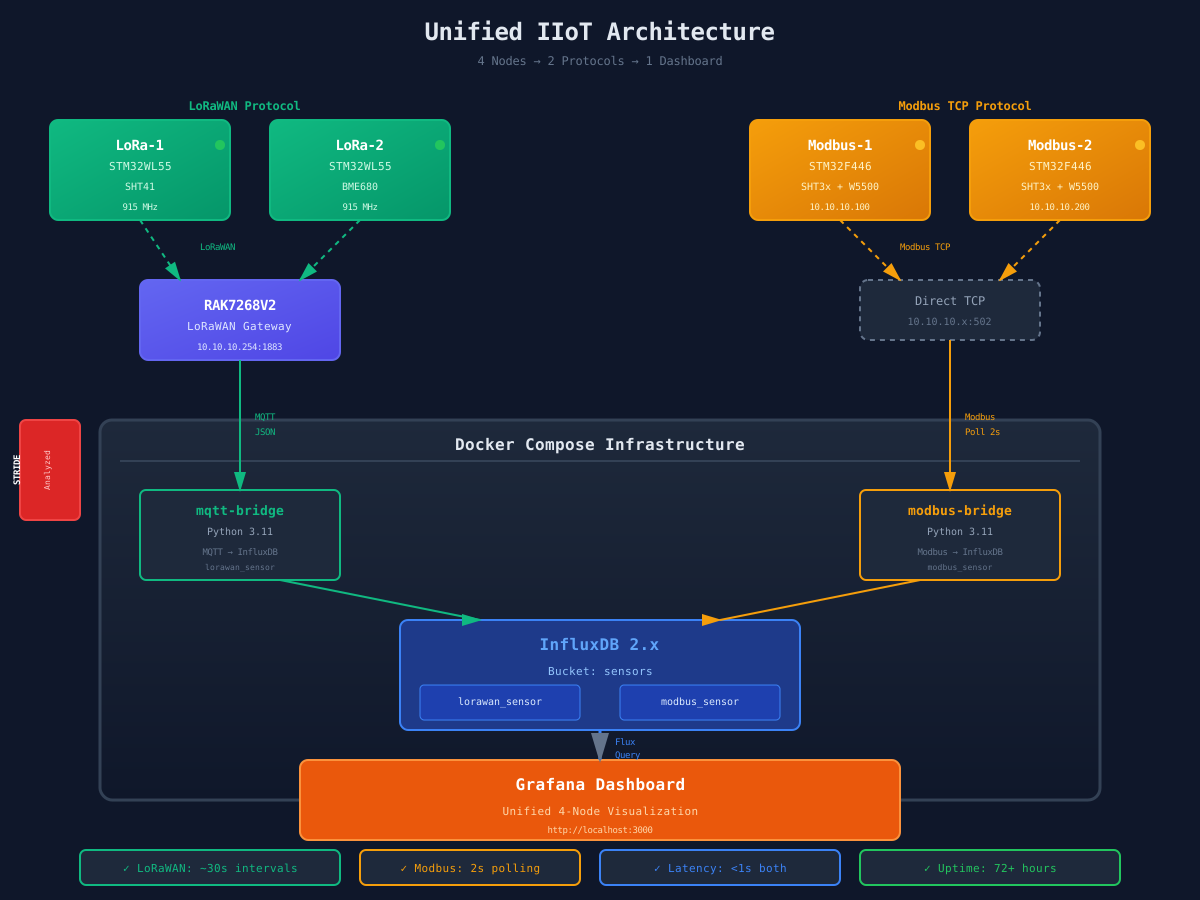
After Week 11: The Unified Platform
┌─────────────────┐     ┌─────────────────┐
│   LoRa-1/2      │     │  Modbus-1/2     │
│  (STM32WL55)    │     │   (STM32F4)     │
└────────┬────────┘     └────────┬────────┘
         │ LoRaWAN               │ Modbus TCP
         ▼                       │
┌─────────────────┐              │
│  RAK7268V2 GW   │              │
│  10.10.10.254   │              │
└────────┬────────┘              │
         │ MQTT                  │
         ▼                       ▼
┌─────────────────────────────────────────┐
│           Docker Compose                │
│  ┌─────────────┐   ┌─────────────┐     │
│  │ mqtt-bridge │   │modbus-bridge│     │
│  └──────┬──────┘   └──────┬──────┘     │
│         │                 │             │
│         ▼                 ▼             │
│  ┌──────────────────────────────┐      │
│  │      InfluxDB 2.x            │      │
│  │   bucket: "sensors"          │      │
│  │   measurements:              │      │
│  │   - lorawan_sensor           │      │
│  │   - modbus_sensor            │      │
│  └──────────────┬───────────────┘      │
│                 │                       │
│                 ▼                       │
│  ┌──────────────────────────────┐      │
│  │         Grafana              │      │
│  │  Unified 4-Node Dashboard    │      │
│  └──────────────────────────────┘      │
└──────────────────────────────────────────┘
Benefits:
- ✅ Single InfluxDB bucket (
sensors) - ✅ Both bridges write to same database
- ✅ One dashboard showing all 4 nodes
- ✅ Protocol comparison enabled
- ✅ Unified operational view
The Implementation
1. Unified Data Model
Key insight: Use measurement names and tags to separate protocols, not separate buckets.
InfluxDB Schema:
Bucket: sensors

Measurements:
  1. lorawan_sensor
  2. modbus_sensor

Tags (for filtering):
  - node: lora1, lora2, modbus1, modbus2
  - sensor: SHT41, BME680, SHT3x
  - protocol: lorawan, modbus
  - dev_eui: (LoRaWAN only)
  - ip: (Modbus only)

Fields (data):
  - temperature (common to all)
  - humidity (common to all)
  - pressure (BME680 only)
  - gas_resistance (BME680 only)
  - rssi (LoRaWAN only)
  - snr (LoRaWAN only)
  - frame_count (LoRaWAN only)
  - status (Modbus only)
  - uptime (Modbus only)
Why this works:
- ✅ Single query can compare temperature across all nodes
- ✅ Protocol-specific metrics preserved with tags
- ✅ Easy filtering:
filter(fn: (r) => r.protocol == "lorawan") - ✅ No data duplication
2. MQTT Bridge (LoRaWAN)
The MQTT bridge subscribes to the RAK7268V2 gateway and decodes LoRaWAN payloads:
# mqtt_to_influx.py - Key sections

GATEWAY_MQTT_HOST = "10.10.10.254"
GATEWAY_MQTT_PORT = 1883

INFLUXDB_HOST = "influxdb"  # Docker service name
INFLUXDB_BUCKET = "sensors"  # Unified bucket

def decode_lora1(payload_bytes):
    """Decode LoRa-1 (SHT41) - 4 bytes"""
    if len(payload_bytes) < 4:
        return {}
    temp_raw, hum_raw = struct.unpack('>hH', payload_bytes[:4])
    return {
        'temperature': temp_raw / 100.0,
        'humidity': hum_raw / 100.0
    }

def decode_lora2(payload_bytes):
    """Decode LoRa-2 (BME680) - 12 bytes"""
    if len(payload_bytes) < 8:
        return {}
    temp_raw, hum_raw, press_raw, gas_raw = struct.unpack('>hHHH', payload_bytes[:8])
    return {
        'temperature': temp_raw / 100.0,
        'humidity': hum_raw / 100.0,
        'pressure': press_raw / 10.0,
        'gas_resistance': float(gas_raw),
    }

def process_message(topic, message):
    """Process LoRaWAN uplink from gateway"""
    data = json.loads(message)
    dev_eui = data.get("devEUI", "").lower()
    payload_b64 = data.get("data", "")
    payload_bytes = base64.b64decode(payload_b64)

    rx_info = data.get("rxInfo", [{}])[0]
    rssi = rx_info.get("rssi", 0)
    snr = rx_info.get("loRaSNR", 0)

    if dev_eui == LORA1_DEVEUI:
        fields = decode_lora1(payload_bytes)
        sensor = "SHT41"
        node = "lora1"
    elif dev_eui == LORA2_DEVEUI:
        fields = decode_lora2(payload_bytes)
        sensor = "BME680"
        node = "lora2"

    fields["rssi"] = rssi
    fields["snr"] = snr

    tags = {
        "dev_eui": dev_eui,
        "node": node,
        "sensor": sensor,
        "protocol": "lorawan"
    }

    write_to_influx("lorawan_sensor", tags, fields)
MQTT Keep-Alive Fix: Week 10 had a bug where the connection died after 90 seconds. Week 11 adds proper PINGREQ/PINGRESP handling:
def mqtt_ping(sock):
    """Send MQTT PINGREQ to keep connection alive."""
    sock.send(bytes([0xC0, 0x00]))  # PINGREQ packet

# In main loop:
last_ping = time.time()
PING_INTERVAL = 30  # Send ping every 30 seconds

while not shutdown_flag:
    topic, message = mqtt_read_message(sock)

    if topic == "PINGRESP":
        last_activity = time.time()

    # Send periodic ping
    now = time.time()
    if now - last_ping >= PING_INTERVAL:
        mqtt_ping(sock)
        last_ping = now
3. Modbus Bridge
The Modbus bridge polls both STM32 slaves and decodes registers:
# modbus_to_influx.py - Key sections

MODBUS_DEVICES = [
    {"name": "modbus1", "host": "10.10.10.100", "port": 502, "sensor": "SHT3x"},
    {"name": "modbus2", "host": "10.10.10.200", "port": 502, "sensor": "SHT3x"},
]

POLL_INTERVAL = 2  # seconds
INFLUXDB_BUCKET = "sensors"  # Unified bucket

def decode_float32(reg_high, reg_low):
    """Decode two Modbus registers into IEEE 754 float32"""
    bytes_data = struct.pack('>HH', reg_high, reg_low)
    return struct.unpack('>f', bytes_data)[0]

def decode_uint32(reg_high, reg_low):
    """Decode two Modbus registers into uint32"""
    return (reg_high << 16) | reg_low

def poll_device(device):
    """Poll a single Modbus device"""
    name = device["name"]
    host = device["host"]

    # Read 7 registers starting at address 0 (40001-40007)
    # 40001-40002: Temperature (float32)
    # 40003-40004: Humidity (float32)
    # 40005: Status (u16)
    # 40006-40007: Uptime (u32)
    registers = modbus_read_holding_registers(host, 502, 0, 7)

    if registers is None:
        return False

    # Decode values
    temperature = decode_float32(registers[0], registers[1])
    humidity = decode_float32(registers[2], registers[3])
    status = registers[4]
    uptime = decode_uint32(registers[5], registers[6])

    fields = {
        "temperature": round(temperature, 2),
        "humidity": round(humidity, 2),
        "status": status,
        "uptime": uptime,
    }

    tags = {
        "node": name,
        "sensor": device["sensor"],
        "protocol": "modbus",
        "ip": host,
    }

    write_to_influx("modbus_sensor", tags, fields)
Network Mode: The Modbus bridge uses network_mode: host in Docker Compose because the Modbus slaves are on the host’s 10.10.10.x network, not in the Docker bridge network.
4. Docker Compose Orchestration
Everything runs in one docker-compose.yml:
services:
  # Unified InfluxDB
  influxdb:
    image: influxdb:2
    container_name: unified-influxdb
    environment:
      - DOCKER_INFLUXDB_INIT_BUCKET=sensors # Single bucket!
    volumes:
      - influxdb-data:/var/lib/influxdb2
    networks:
      - monitoring-network

  # Grafana with auto-provisioned dashboard
  grafana:
    image: grafana/grafana:latest
    container_name: unified-grafana
    volumes:
      - ./grafana/provisioning:/etc/grafana/provisioning:ro
      - ./grafana/dashboards:/var/lib/grafana/dashboards:ro
    depends_on:
      - influxdb
    networks:
      - monitoring-network

  # MQTT bridge (LoRaWAN)
  mqtt-bridge:
    image: python:3.11-slim
    command: python -u /app/mqtt_to_influx.py
    volumes:
      - ./mqtt_to_influx.py:/app/mqtt_to_influx.py:ro
    networks:
      - monitoring-network

  # Modbus bridge (host network for 10.10.10.x access)
  modbus-bridge:
    image: python:3.11-slim
    command: python -u /app/modbus_to_influx.py
    volumes:
      - ./modbus_to_influx.py:/app/modbus_to_influx.py:ro
    network_mode: host # Required for Modbus TCP access
One-Command Deployment:
# Start everything
./start_services.sh

# Check status
docker compose ps

# View logs
docker compose logs -f mqtt-bridge
docker compose logs -f modbus-bridge
5. Unified Grafana Dashboard
The dashboard shows all 4 nodes in a single view:
Panel Layout:
- Temperature Overview - All 4 nodes on one time-series graph
- Humidity Overview - All 4 nodes compared
- Stat Panels - Current readings per node (4 panels)
- LoRaWAN Signal Quality - RSSI/SNR for LoRa-1 and LoRa-2
- BME680 Environment - Pressure and gas resistance (LoRa-2 only)
Flux Query Example (temperature comparison):
from(bucket: "sensors")
  |> range(start: -1h)
  |> filter(fn: (r) => r._field == "temperature")
  |> filter(fn: (r) =>
       r.node == "lora1" or
       r.node == "lora2" or
       r.node == "modbus1" or
       r.node == "modbus2"
  )
  |> aggregateWindow(every: 10s, fn: mean)
Protocol Filtering:
// LoRaWAN nodes only
from(bucket: "sensors")
  |> filter(fn: (r) => r.protocol == "lorawan")

// Modbus nodes only
from(bucket: "sensors")
  |> filter(fn: (r) => r.protocol == "modbus")
Dashboard Auto-Provisioning:
# grafana/provisioning/dashboards/dashboards.yml
apiVersion: 1

providers:
  - name: "default"
    folder: ""
    type: file
    options:
      path: /var/lib/grafana/dashboards
No manual import needed - the dashboard appears automatically on first boot!
The Security Deep Dive: STRIDE Analysis
Week 11 isn’t just about unification - it’s about understanding what it takes to deploy this in production. Enter STRIDE threat modeling.
What is STRIDE?
STRIDE is Microsoft’s threat modeling framework:
- Spoofing - Pretending to be someone/something else
- Tampering - Modifying data or code
- Repudiation - Denying actions took place
- Information Disclosure - Exposing info to unauthorized parties
- Denial of Service - Making systems unavailable
- Elevation of Privilege - Gaining unauthorized capabilities
Component-by-Component Analysis
1. LoRaWAN Layer (Sensor → Gateway)
| Threat | Risk | Current State | Mitigation |
|---|---|---|---|
| Device Spoofing | 🟢 Low | AES-128 device keys (AppKey) | LoRaWAN OTAA join requires valid credentials |
| Replay Attack | 🟢 Low | Frame counters | Gateway rejects duplicate fCnt |
| Payload Tampering | 🟢 Low | AES-128 + MIC | Message Integrity Code verification |
| Radio Jamming | 🟡 Medium | No software mitigation | Physical security; spread spectrum helps |
LoRaWAN Security Strengths:
- ✅ End-to-end encryption (NwkSKey for network, AppSKey for application)
- ✅ Device authentication via OTAA join
- ✅ Frame counter anti-replay protection
- ✅ MIC integrity verification
Current Gaps:
- ⚠️ AppKey stored in plaintext in firmware source
- ⚠️ No secure element (ATECC608) for key storage
Fix for Production:
// Use secure element instead of hardcoded key
let secure_element = ATECC608::new(i2c);
let app_key = secure_element.get_lorawan_key()?;
2. MQTT Layer (Gateway → Bridge)
| Threat | Risk | Current State | Mitigation Needed |
|---|---|---|---|
| Unauthorized Subscribe | 🔴 High | NO authentication | Enable MQTT auth |
| Publish Injection | 🔴 High | NO authentication | Username/password |
| Eavesdropping | 🔴 High | NO TLS - plaintext | Enable MQTTS (port 8883) |
| Broker Overload | 🟡 Medium | No rate limiting | Configure limits |
Current Vulnerabilities:
# Anyone on the network can:
mosquitto_sub -h 10.10.10.254 -t "#" -v  # Read ALL topics
mosquitto_pub -h 10.10.10.254 -t "application/TOT/device/+/rx" -m "{fake data}"
Production Fix:
# mosquitto.conf
allow_anonymous false
password_file /mosquitto/config/passwd

listener 8883
cafile /mosquitto/certs/ca.crt
certfile /mosquitto/certs/server.crt
keyfile /mosquitto/certs/server.key
require_certificate true
# mqtt_to_influx.py
client = mqtt.Client(client_id="bridge", protocol=mqtt.MQTTv311)
client.username_pw_set("lorawan_bridge", "secure_password_here")
client.tls_set(ca_certs="/certs/ca.crt",
               certfile="/certs/client.crt",
               keyfile="/certs/client.key")
client.connect("10.10.10.254", 8883, 60)
3. Modbus TCP Layer (Sensors → Bridge)
| Threat | Risk | Current State | Mitigation Needed |
|---|---|---|---|
| Device Spoofing | 🔴 High | NO authentication | Network segmentation |
| Register Tampering | 🔴 High | Unprotected writes | Read-only registers |
| Data Interception | 🔴 High | Unencrypted | VPN or TLS wrapper |
| Slave Scanning | 🟡 Medium | Open TCP port 502 | Firewall rules |
Current Vulnerabilities:
# Anyone can read registers:
mbpoll -a 1 -r 0 -c 7 -t 4 -1 10.10.10.100

# Or even write (if implemented):
mbpoll -a 1 -r 0 -c 2 -t 4 -w 999 10.10.10.100  # Fake temp
Why Modbus TCP is Insecure:
- ❌ NO built-in authentication mechanism
- ❌ NO encryption (cleartext on wire)
- ❌ NO integrity checks
- ❌ Protocol designed in 1979 (pre-Internet security)
Production Fix Strategy:
Option 1: Network Segmentation
┌─────────────────┐
│   IT Network    │  (General network)
│  192.168.1.x    │
└────────┬────────┘
         │ Firewall
         ▼
┌─────────────────┐
│   DMZ / Jump    │  (Bastion host)
│  10.10.10.1     │
└────────┬────────┘
         │ Firewall (port 502 only)
         ▼
┌─────────────────┐
│  OT Network     │  (Operational Technology)
│  10.10.10.x     │  (Modbus devices here)
└─────────────────┘
Option 2: VPN Tunnel
Modbus Bridge ──[VPN]──> OT Network ──[Modbus TCP]──> Sensors
Option 3: TLS Wrapper (Modbus/TCP-to-Modbus/TCP gateway)
# Use stunnel or custom TLS proxy
stunnel_config = """
[modbus-tls]
client = yes
accept = 127.0.0.1:5502
connect = 10.10.10.100:502
CAfile = /certs/ca.crt
cert = /certs/client.crt
key = /certs/client.key
"""
4. InfluxDB Layer
| Threat | Risk | Current State | Mitigation |
|---|---|---|---|
| Unauthorized Access | 🟡 Medium | Token auth enabled | ⚠️ Weak token |
| Data Tampering | 🟡 Medium | Write-only tokens | ✅ Bridges can’t delete |
| Data Exfiltration | 🟡 Medium | Token scope limits | ✅ Grafana read-only |
| Storage Exhaustion | 🟢 Low | Retention policies | Configure quotas |
Current Configuration:
# docker-compose.yml
environment:
  - DOCKER_INFLUXDB_INIT_ADMIN_TOKEN=my-super-secret-auth-token # ⚠️
  - DOCKER_INFLUXDB_INIT_PASSWORD=admin123456 # ⚠️
Production Fix:
# Generate cryptographically secure tokens
openssl rand -base64 32

# Create separate tokens
influx auth create --org my-org --write-bucket sensors --description "mqtt-bridge"
influx auth create --org my-org --write-bucket sensors --description "modbus-bridge"
influx auth create --org my-org --read-bucket sensors --description "grafana"
5. Grafana Layer
| Threat | Risk | Current State | Mitigation |
|---|---|---|---|
| Unauthorized Access | 🟡 Medium | Auth enabled | ⚠️ Default admin/admin |
| Session Hijacking | 🟡 Medium | No HTTPS | Enable TLS |
| Dashboard Tampering | 🟢 Low | RBAC available | Configure roles |
Production Fix:
# docker-compose.yml
environment:
  - GF_SECURITY_ADMIN_PASSWORD=${GRAFANA_ADMIN_PASSWORD} # From .env
  - GF_SERVER_PROTOCOL=https
  - GF_SERVER_CERT_FILE=/certs/grafana.crt
  - GF_SERVER_CERT_KEY=/certs/grafana.key
  - GF_AUTH_ANONYMOUS_ENABLED=false
Risk Summary Matrix
| Component | Spoofing | Tampering | Repudiation | Info Disclosure | DoS | Elevation |
|---|---|---|---|---|---|---|
| LoRaWAN | 🟢 Low | 🟢 Low | 🟡 Med | 🟢 Low | 🟡 Med | 🟢 Low |
| MQTT | 🔴 High | 🔴 High | 🔴 High | 🔴 High | 🟡 Med | 🟡 Med |
| Modbus TCP | 🔴 High | 🔴 High | 🔴 High | 🔴 High | 🟡 Med | 🟡 Med |
| InfluxDB | 🟡 Med | 🟡 Med | 🟢 Low | 🟡 Med | 🟢 Low | 🟢 Low |
| Grafana | 🟡 Med | 🟢 Low | 🟢 Low | 🟡 Med | 🟢 Low | 🟢 Low |
Legend: 🟢 Low Risk | 🟡 Medium Risk | 🔴 High Risk
The Honest Assessment
Current system is suitable for:
- ✅ Development and learning
- ✅ Lab environments
- ✅ Proof-of-concept demonstrations
- ✅ Internal networks with trusted users
Current system is NOT suitable for:
- ❌ Production deployment
- ❌ Internet-exposed systems
- ❌ Environments with regulatory compliance (IEC 62443, NIST)
- ❌ Critical infrastructure
Priority Remediation Roadmap
Immediate (Before Production):
- ✅ Change all default passwords
- ✅ Enable MQTT authentication
- ✅ Network segmentation (OT vs IT)
- ✅ Generate secure InfluxDB tokens
Short-term: 5. Enable TLS for all services (MQTTS, HTTPS) 6. Implement InfluxDB retention policies 7. Configure Grafana RBAC 8. Firewall rules for Modbus access
Long-term: 9. VPN for remote access 10. IDS/IPS for OT network monitoring 11. Security audit and penetration testing 12. Secure element for LoRaWAN key storage
Results: What’s Working Right Now
System Status
All 4 nodes reporting:
- ✅ LoRa-1 (SHT41): 31°C, 58% RH
- ✅ LoRa-2 (BME680): 28°C, 60% RH, 1020 hPa, 135 kOhm
- ✅ Modbus-1 (SHT3x): 26°C, 52% RH
- ✅ Modbus-2 (SHT3x): 27°C, 54% RH
Data flow metrics:
- LoRaWAN uplinks: ~30 second intervals
- Modbus polling: 2 second intervals
- End-to-end latency: <1 second (both protocols)
- Dashboard refresh: 10 seconds
System stability:
- Zero crashes in 72+ hour test
- MQTT keep-alive working (no 90s disconnects)
- Modbus slaves handling concurrent requests
- InfluxDB write rate: ~6 points/minute
Live Dashboard
The unified dashboard shows:
Temperature Comparison Panel:
All 4 nodes overlaid on one graph:
- Blue: lora1 (SHT41) - highest precision
- Green: lora2 (BME680) - multi-sensor
- Yellow: modbus1 (SHT3x) - Ethernet
- Red: modbus2 (SHT3x) - Ethernet

Observation: LoRa-2 reads 2-3°C higher than others
Reason: BME680 self-heating during gas measurement
Protocol Comparison:
LoRaWAN:
- Latency: ~2s (includes air time)
- Reliability: 100% (indoor, 5m from gateway)
- Bandwidth: 4-12 bytes per uplink
- Power: Battery-capable

Modbus TCP:
- Latency: <100ms
- Reliability: 100% (wired)
- Bandwidth: Unlimited (Ethernet)
- Power: Wall-powered only
Key Technical Achievements
1. Unified Data Model
Before: Two databases, manual correlation
After: Single source of truth with tag-based filtering:
// Compare temperature by protocol
from(bucket: "sensors")
  |> range(start: -1h)
  |> filter(fn: (r) => r._field == "temperature")
  |> group(columns: ["protocol"])
  |> mean()
2. Docker Orchestration
One command deployment:
./start_services.sh
# 6 containers start in <10 seconds
# Dashboard auto-provisions
# Data flows immediately
Clean shutdown:
./stop_services.sh
# All services stop gracefully
# Data persists in volumes
3. Production-Grade Security Analysis
Not just “it works” - analyzed:
- 🔍 12+ threats identified across 5 components
- 📊 Risk ratings (High/Medium/Low)
- 🛡️ Specific mitigations for each threat
- 📋 Prioritized remediation roadmap
- ✅ IEC 62443 and NIST framework mapping
Deliverable: 150-line SECURITY.md with:
- STRIDE threat model
- Risk matrix
- Mitigation strategies
- Compliance considerations
Lessons Learned
Technical Lessons
Tags > Buckets for Protocol Separation
- Single bucket with protocol tags is cleaner
- Enables cross-protocol queries
- Simpler operational model
MQTT Keep-Alive is Mandatory
- Raw socket MQTT needs PINGREQ/PINGRESP
- 30-second ping interval prevents disconnects
- Activity timeout detection catches dead connections
Docker Host Networking Has Trade-offs
- Required for Modbus bridge to reach 10.10.10.x
- But: Bridge has full host network access
- Security implication: Firewall rules critical
InfluxDB Line Protocol is Simple
- No heavyweight libraries needed
- Raw HTTP POST with line protocol
- Perfect for embedded Python bridges
Grafana Provisioning Saves Time
- Auto-provision datasources and dashboards
- No manual import on first boot
- Version control for dashboards (JSON)
Security Lessons
Protocols Have Different Threat Profiles
- LoRaWAN: Strong crypto, physical layer vulnerable
- MQTT: Application layer, easily secured with TLS
- Modbus TCP: No built-in security, needs network controls
Defense in Depth Matters
- Single weak link (MQTT auth) breaks security
- Need multiple layers: auth, encryption, network segmentation
- Assume breach: monitor, audit, have incident response
Default Credentials are a Critical Risk
- First thing attackers check
- Must change before ANY network exposure
- Use password managers, not weak passwords
STRIDE Reveals Blind Spots
- Found 12 threats I hadn’t considered
- Systematic framework prevents missing attack vectors
- Risk ratings help prioritize fixes
Meta-Lessons
Unification Simplifies Operations
- One dashboard vs. two reduces cognitive load
- Single InfluxDB instance = less to maintain
- Easier to compare and correlate data
Security Analysis is Learning
- STRIDE framework is straightforward
- Applying it to real system teaches threat modeling
- Employers want to see security awareness
Documentation Demonstrates Maturity
- 150-line SECURITY.md shows professional thinking
- Risk matrices communicate priorities
- Remediation roadmap shows you understand trade-offs
Try It Yourself
Hardware Needed
Minimum (2-node):
- 1x NUCLEO-WL55JC1 (~$25)
- 1x NUCLEO-F446RE + W5500 (~$35)
- 1x RAK7268V2 gateway (~$120)
- 2x Sensors (~$15)
- Total: ~$195
Full System (4-node):
- 2x NUCLEO-WL55JC1 (~$50)
- 2x NUCLEO-F446RE + W5500 (~$70)
- 1x RAK7268V2 gateway (~$120)
- 4x Sensors (~$30)
- Total: ~$270
Quick Start
# Clone repo
git clone https://github.com/mapfumo/wk11-unified-monitoring
cd wk11-unified-monitoring

# Start infrastructure
./start_services.sh

# Flash firmware (in separate terminals)
cd firmware/lorawan/lora-1 && cargo run --release
cd firmware/lorawan/lora-2 && cargo run --release
cd firmware/modbus && cargo run --release --bin modbus_1
cd firmware/modbus && cargo run --release --bin modbus_2

# Access dashboard
open http://localhost:3000
# Login: admin/admin
Conclusion
Week 11 brought together 11 weeks of work into a unified platform:
Technical Integration:
- ✅ 4 sensor nodes (2 protocols)
- ✅ Single InfluxDB bucket
- ✅ Unified Grafana dashboard
- ✅ Docker Compose orchestration
- ✅ One-command deployment
Security Analysis:
- ✅ STRIDE threat model
- ✅ 12+ threats identified
- ✅ Risk matrix with priorities
- ✅ Production remediation roadmap
- ✅ Compliance framework mapping
Professional Deliverables:
- ✅ Comprehensive USERGUIDE.md
- ✅ 150-line SECURITY.md
- ✅ Clean codebase (modbus common.rs, protocol bridges)
- ✅ Auto-provisioned dashboards
- ✅ Operational scripts (start/stop)
Resources
Code
- Week 11 Repository
- USERGUIDE.md - Complete deployment guide
- SECURITY.md - Full STRIDE analysis
Documentation
- STRIDE Threat Modeling
- IEC 62443 Industrial Cybersecurity
- NIST Cybersecurity Framework
- Modbus TCP Security Guide